Stand Out Jojosapiens unlock routes
- Space Oddity. Start with Major Tom once you have 45 Stands unlocked in-game. Collect 16 town surveys, return to Major Tom, then take the papers to D’Arby. Bring the survey chip back to Major Tom, then craft and hand him a Bizarre Arrow. Collect the Jojosapiens Stand Chip as the final reward.
- Catalog. The other route requires 7,500 accessories sold through the Catalog.
Using the final chip permanently replaces your equipped Stand. Check Stand Chip storage before equipping it. If you finished the quest and the reward is missing, see the developer’s rejoin fix.
Fighting while Unformed
Jojosapiens starts Unformed, with an unsummonable wireframe figure behind it. You take 15% more incoming damage until you take human form. Death returns you to Unformed.
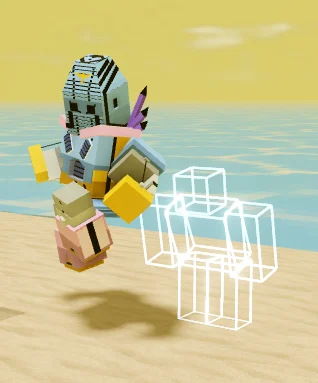
Survey Rush, Final Answer and Loose Papers
Survey Rush
Base cooldown 9s. Send a barrage of blockable, arcing papers ahead. Hits fill the opponent’s screen with survey popups.
Final Answer
Base cooldown 11s. Dash in and punch the enemy back, breaking guard and scenery in the path. Check the Flanking upgrades before relying on the guard break.
Loose Papers
Base cooldown 6s. Put up to two paper bundles on the ground for 15s each. Each bundle normally trips the first enemy who steps on it. Anyone can pick one up and rethrow it, so place bundles where you can keep an eye on them. Carbon Paper I lets each bundle trip two different enemies.
Loose Papers helps cover a route you can watch, such as a doorway. Place one bundle on the approach and keep the other available in case the fight moves. Other players can pick them up, so watch where a bundle ends up. If someone is guarding, base Final Answer can break the guard. With a Flanking upgrade, account for which way the target is facing before you use it.
Answer or skip the combat question
Questionnaire has a 20s base cooldown. In combat, choose one of three answers within 8s by clicking it or pressing its assigned skill key. Each correct answer earns 2 Data.
You start with three skips. Regain one skip for every three correct answers, up to a cap of three. Save a skip for a question you can’t answer confidently in time.
The correct-answer demonstration shows a question about Beach Boy and the cursor choosing Pesci. Use the choices on your own prompt when the question changes. Watch the countdown while you read. Spend a skip when you cannot work out the choice in the time left. When a question is familiar, a correct answer also counts toward regaining a skip.
Earn Data and spend your upgrade picks
Alongside the 2 Data from a correct answer, a full combo against the same eligible enemy grants 1 Data at most once every 8s. Allies, your own summons and practice targets are excluded. Dismissing your Stand keeps your Data. Death or a Stand change clears it.
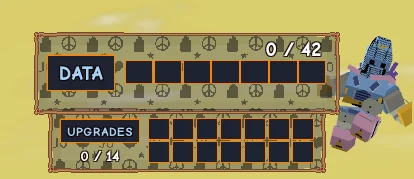
Every 3 Data gives you one pick from three options. Repeating a pick can strengthen that upgrade family, with a limit of 14 upgrades total. Hover below the meter to read upgrade details. When you become Ultimate JoJo, any unchosen options are randomized.
One correct answer earns 2 Data. Follow it with one eligible full combo for 1 more and you have enough for your first upgrade pick. Read the three options when the pick appears. If you have been practicing the inputs on a dummy, move on to an eligible enemy for the Data step. A second full combo on that same enemy within the eight-second window will not earn another point.
Choose upgrades for the fight
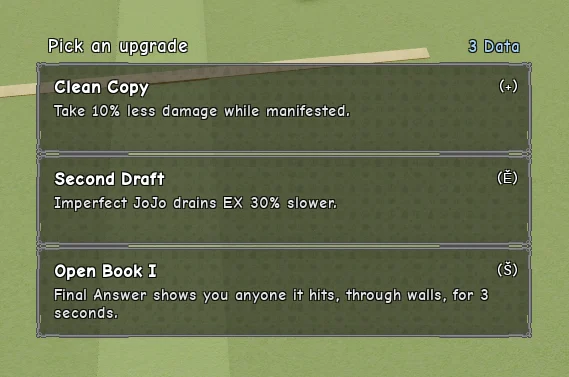
Against projectiles, look for Cardboard Surveys. For a tougher manifested Stand, pick Clean Copy. Choose Flanking for reach if you can give up Final Answer’s guard break. Keep the base guard break if you want to benefit from Trick Question I.
| Upgrade | Documented effect |
|---|---|
| Clean Copy | Take 10% less damage while manifested. |
| Rush Order | Move 8% faster while manifested. |
| Second Draft | Imperfect JoJo drains EX 30% more slowly. |
| Cardboard Surveys I–III | Every fourth, every other, then every Survey Rush sheet stops enemy projectiles it passes through. |
| Sticky Notes I–II | Survey Rush hits reduce the target’s attack speed by 15% for 3s or 25% for 4s. |
| Paper Cut I | The last Survey Rush sheet inflicts bleed for 3s. |
| Carbon Paper I | Each Loose Papers bundle can trip two different enemies. |
| Open Book I–III | Final Answer reveals enemies it hits through walls for 3s, 6s or 10s. |
| Blackout I–III | Final Answer blinds targets it hits for 1s, 1.6s or 2.4s. |
| Bizarre Strength I–III | Final Answer knocks enemies back 2×, 2.5× or 3× as far. |
| Land Survey I–II | Final Answer becomes a ground punch with a radial shockwave 12 or 16 studs wide. |
| Trick Question I | Final Answer deals +6 damage when it breaks guard. The card’s Tier II description is incomplete. |
| Flanking I–III | Final Answer moves behind an enemy up to 24, 34 or 40 studs away before punching. Tier III adds 25% damage. All three tiers remove the guard break. An enemy facing Jojosapiens can block. |
| Paper Planes I | The card leaves the effect unspecified. |
Imperfect JoJo and Ultimate JoJo
The developer clips show what the two form changes look like. Activation conditions are unlisted in the current Stand card. The card confirms that Second Draft slows Imperfect JoJo’s EX drain and that unchosen upgrade options are randomized when you become Ultimate JoJo.

Sources
Sources checked November 18, 2026.